Trace
Understand tracking health, investigate issues and verify recovery from saved evidence.
Trace helps your team catch tracking problems and investigate the evidence behind them. It combines optional browser observations with independent Google Analytics and Tag Manager connections in one Project environment.
Use it for failed tracking requests, possible duplicates, missing events, drops in key event delivery, changes in event structure, consent signals, personal data reaching a service, invalid ecommerce values and unexpected Google changes. With Pulse PR checks, it also points out tracking changes in pull requests before they reach production. Start with Set up Trace. The Trace product page compares it with other tracking-monitoring tools.
Two independent starting points
Use either or both. A Google-only workspace does not need a website script. Sending-versus-report comparisons need the matching GA4 stream and sufficient browser evidence.
Find your way around
- Overview summarizes active issues, observation freshness and services that need attention. Key event delivery compares key data-layer events, such as
purchaseorgenerate_lead, with the share of them each service received over 7 days, weakest service first. Recent changes lists the last 7 days of Tag Manager and collection changes. With the opt-in Campaign tagging setting, a Campaign tagging card shows tagged landings over 7 days, UTM-tagged pages missingutm_mediumorutm_source, and ad clicks whose page sent nothing to Google or Meta. It counts sampled page views, not visits or attribution. - Issues is the filtered list of findings. Selecting one opens its investigation in a sheet, with a plain-language summary, evidence, finding history and the published expectation. Export CSV saves the list as you filtered it.
- Changes lists 30 days of Tag Manager publications and Trace collection publications, each with the number of issues first found within 6 hours of it. Changes close in time do not prove the cause.
- Services is the service map: each service on your website with its Tag Manager tags, real traffic and consent status, each with its own source and date, how Trace knows it and one next step. With the SiteOS Cookie banner, that step is Add to Cookie, Publish in Cookie or Identify in Cookie; with another consent source, it is Name this service or Name this tag. Hosting and CDN addresses are summarized, never listed as services. It also leads to Google and SiteOS Analytics reports.
- Tag Manager opens the connected container’s tags, versions and changes. See Google Tag Manager.
- Consent shows the consent source, banner decisions, the latest page sample and related findings.
- Explorer provides event and property inventory, browser activity and tag reviews. Events and Properties also offer Export CSV.
- The Tracking rules page holds the expectations you review and publish. Import or export moves the tracking plan in and out as CSV, JSON Schema or SiteOS JSON.
- Installation provides the observer snippet and connection setup. Settings holds the Collection, Notifications and Coverage tabs, and Notifications routes team alerts.
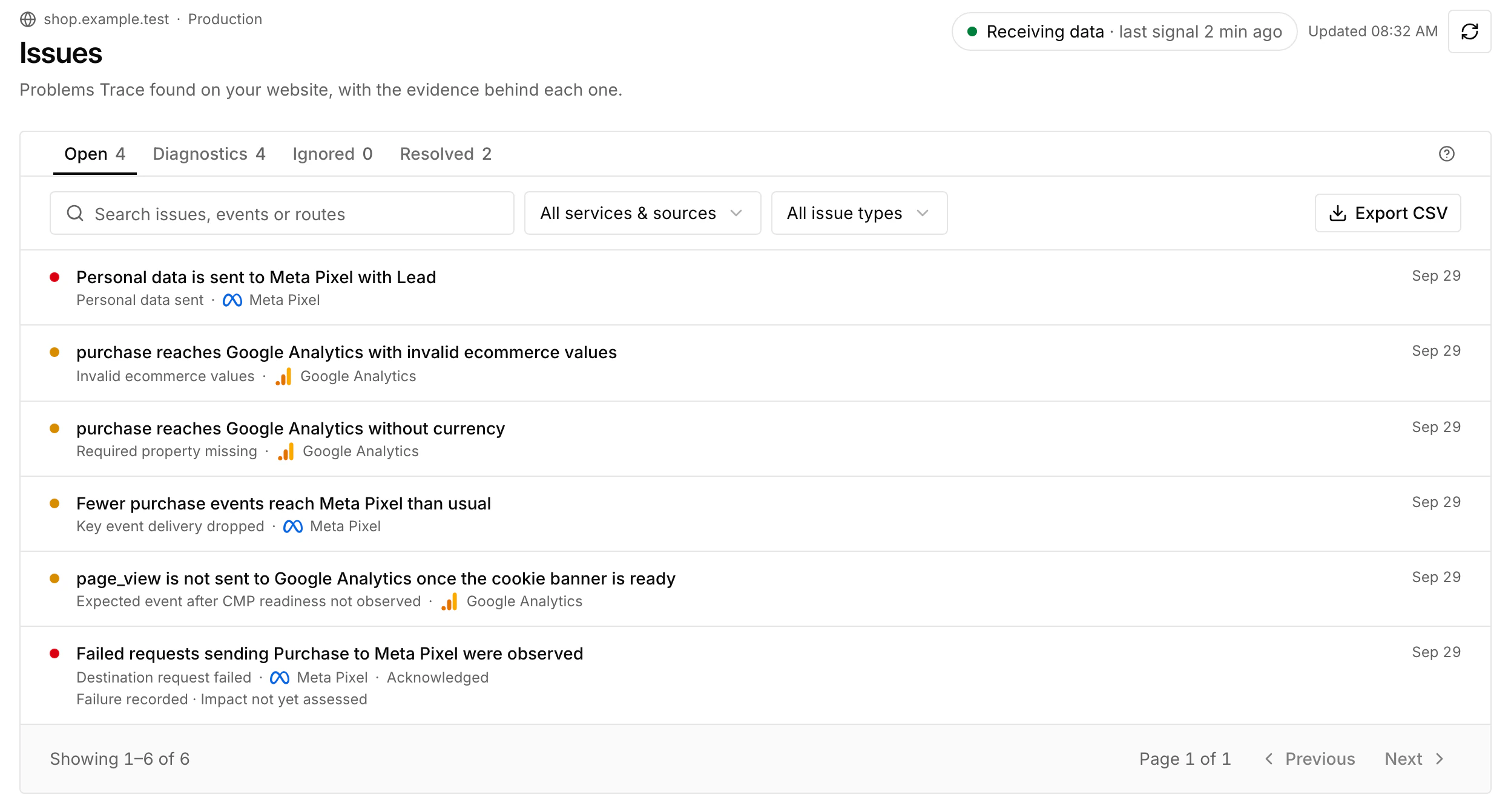
Automatic monitoring works without a tracking plan. Add explicit rules when the website has a confirmed expectation, such as a successful form action that must send a particular event.
What the evidence means
Browser observations describe what Trace could observe in its supported scope. They are not unique visitors, business conversions or proof of downstream processing. A data-layer event, a GTM execution callback and a destination request are separate stages.
Key event delivery compares sampled observations on the same pages, not conversions. Consent choices and blockers lower a service’s share without any fault, so a gap shows where to look, not a lost conversion.
Connected GA4 and SiteOS Analytics views use their own report counts. A zero issue count does not prove complete coverage; check the evidence source, freshness and selected environment.
Continue with the right guide
Read Observer and coverage for installation and provider support, Issues and rules for investigations, and Consent and privacy for collection controls.
Use Google Analytics and Tag Manager for Google connections. Alerts, exports and AI covers team workflows.
Analytics measures website traffic and conversions. Pulse runs deliberate browser or code checks. Trace investigates the tracking evidence around your website.