Pulse overview
Check pages and browser journeys, verify GitHub pull requests, and investigate errors, logs, traces and replays with your team or agent.
Pulse runs checks on SiteOS infrastructure to verify the work your website does. Check that a page responds, test that a visitor can search, navigate or submit a form, verify changes on a pull request and inspect the evidence when something fails. It also collects errors, logs, traces and masked session replays from your website and server.
Enable Pulse in the intended shared Project environment. Production and Staging keep separate targets, published checks and settings. You can use Pulse without installing the other SiteOS services. The Pulse product page compares it with other monitoring tools.
Choose the right check
Page and HTTP Checks are saved in Pulse with a path and an optional schedule; they need no repository or test code. Browser Checks reuse standard Playwright tests from your repository. Pulse saves their setup and, with automatic updates on, refreshes them after successful GitHub deployments of the configured environment. Code Checks run an explicitly published command against an exact PR source snapshot on SiteOS's hosted executor; the code guide lists its supported environment.
When Trace is set up for the same environment, browser checks on a pull request also compare the tracking the preview sends and add an advisory Tracking section to the GitHub Check when it changes. With the SiteOS Cookie banner as Trace's consent source, passing checks also run a short consent pass with Accept all and Reject all. See tracking in browser checks.
Errors, logs, traces and replay
To collect runtime errors from visitors' browsers and your server, use Errors. To see server logs, browser and server request traces and masked recordings of consented visits, use Logs, traces & replay. An error links to its trace and recording when they exist. All of these work without Checks, and their results never open or resolve monitoring incidents.
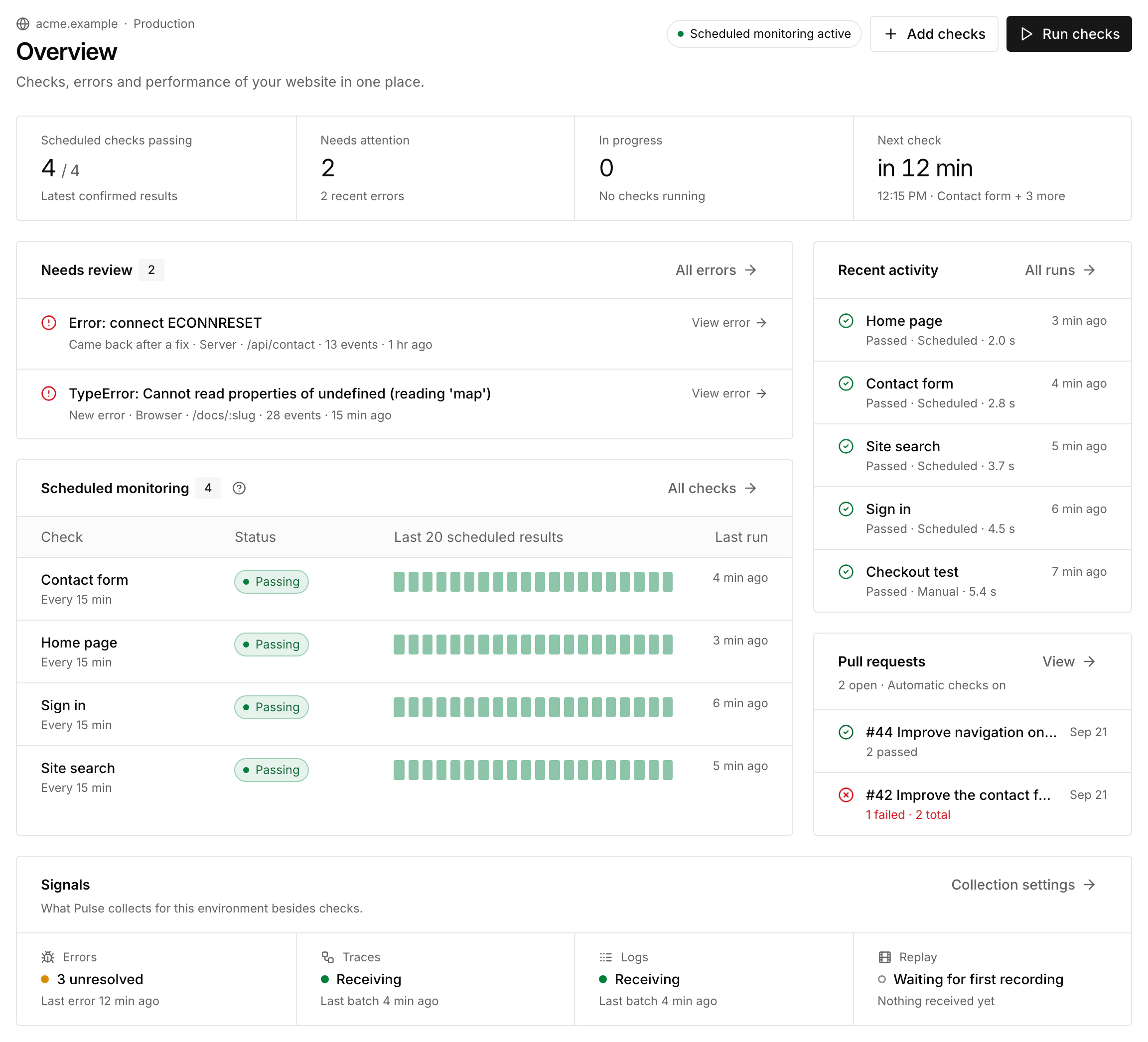
The Pulse sidebar groups Monitoring (Overview, Checks, Runs and Pull requests), Observe (Errors, Traces, Logs and Replay) and Manage (Settings and Notifications). Overview adds recent and recurring errors to Needs review and shows the state of each signal in Signals. Set up each signal in Settings → Collection, manually or with Set up with AI.
Keep monitoring and PR checks independent
For each browser Check, choose a schedule, PR participation, both or manual use only. Pausing Project monitoring leaves PR verification independent. Disabling a Check prevents its automatic use in either context.
Live monitoring runs each Check's active version: the one you published or the one Pulse refreshed from a successful deployment. A local file edit does not change it. PR browser checks also use the active version; a pull request cannot replace those tests. PR results do not open or resolve live monitoring incidents.
Work with your agent
Install the SiteOS plugin, sign in and select the Organization, Project and environment. Then give your agent a concrete target:
Pulse skills guide authoring, validation and publication. MCP reads Check settings, effective schedules, PR eligibility, run history, saved failure evidence, errors, logs, traces and recording metadata. The CLI saves Check setup, runs local tests and publishes. Reading a saved run does not execute the check again.
Free monthly credits and usage
Pulse includes free monthly execution credits, shared across the Organization's Projects and environments. They continue beyond early access. Open Usage & limits for the current allowance and renewal date.
With budget enforcement enabled, the standard allowance is $10 per month. Browser and code execution use measured time; the built-in secret scanner has a separate rate. There is no daily PR count quota. A run waiting for budget or capacity has not failed a website assertion.
When the application says Estimate · no charges, the displayed usage is a forecast and does not deduct credits. Read Pulse execution budget for rates, reservations, waiting checks and renewal behavior.
What a successful setup proves
Validate a useful local check, publish it to the selected environment, then inspect a real authorized run and its saved result. For automatic updates, confirm after a website deployment that the Check's refresh source matches the deployed commit. For PR verification, complete a separate GitHub round trip and confirm the result belongs to the current head commit. A local pass, successful upload or manually started run alone does not prove automatic PR checks or scheduled monitoring are working.