Site audits and Performance
Check public pages, inspect technical findings and verify the changes you publish.
Site Audit checks the public HTML of the website in your selected Project environment. It records response status, metadata, headings, internal links, canonical URLs, robots directives, sitemap evidence, structured data and supported technical GEO signals. Each audit then checks the same pages for accessibility.
Robots rules are checked per crawler. A block for Googlebot or Bingbot is an error, and a block for an AI search crawler (OAI-SearchBot, PerplexityBot, Claude-SearchBot or Applebot) is a warning. Both are reported for the homepage, pages in your sitemap, or every page when Expect crawled pages to be indexable is on in SEO/GEO settings; the same block on other pages, such as Disallow: /cart, is shown only as a notice. Training crawlers such as GPTBot and ClaudeBot and user-triggered fetchers such as ChatGPT-User are recorded as policy information only.
A robots.txt that returns 404, 403 or another 4xx status other than 429 counts as no robots.txt, as it does for Google: every crawler may crawl the site. The Crawler access card on Overview shows what robots.txt allows at the website root for search engines, AI search, user-triggered fetchers and AI training crawlers. It is information only; findings report the blocks on pages that should be found.
The audit also reports problems that can take a whole site out of search: pages that still return a server error after one retry, redirect loops or chains of more than five hops, a robots.txt that returns a server error (the audit then finishes as partial), a declared sitemap that cannot be read, and noindex across the site when the sitemap or that setting shows the site is meant to be indexed.
Further checks cover structure, security and trust:
- Soft 404s: missing addresses that answer with HTTP 200, for example by showing the homepage, and pages titled "Page not found" that return 200.
- Pages that need JavaScript: response HTML with an empty application shell and almost no text. Many AI crawlers read only the response HTML, so the finding points to Performance to compare the rendered page.
- HTTPS: internal links or a canonical that use
http://, and scripts, images or other resources loaded over HTTP (mixed content). - hreflang: unsupported language or region codes, annotations that leave out the page itself, and alternates that do not link back or cannot be indexed.
- Site structure: sitemap pages that no crawled page links to, and pages five or more clicks from the homepage. Both need a complete crawl.
- Sitemap dates:
lastmoddates in the future, or one date repeated on every entry. - Structured data: properties Google requires for supported types such as LocalBusiness, Product, BreadcrumbList and SoftwareApplication, selected recommended properties, FAQ and HowTo markup that no longer gets a Google rich result, and an organization's reviews of itself.
- Trust and entity: About, contact and legal pages linked from the homepage, an author and date on articles, and the same organization name and profiles across pages.
- Similar pages: five or more indexable pages with at least 90% the same text, which Google's spam policies can treat as doorway or scaled content.
These are warnings or notices; none claims a ranking effect.
Choose the scope
Set the page limit and excluded paths in SEO/GEO settings → Audit scope. Full audits check 100 pages by default and currently support up to 500. Repeating a full audit starts a new crawl; it does not continue the previous crawl's unfinished pages.
With Expect crawled pages to be indexable on, list sections that should stay out of search, such as /drafts, under Intentionally hidden paths. Those pages are still crawled, but noindex there is only a notice, and they are left out of the sitewide noindex, orphan, deep-page and similar-page checks.
Besides your pages, each full audit requests one random address, such as /siteos-soft-404-check-…, to see how the website answers a missing page. When /sitemap.xml is missing and robots.txt names no sitemap, it also tries /sitemap_index.xml and /sitemap-index.xml. These requests can appear in your server logs.
Public staging pages work when their origin is configured for the selected environment. Pages behind authentication and arbitrary preview URLs are not covered. Robots rules, exclusions and crawl limits still apply to selected-page checks.
The CLI offers the same scopes: siteos seo audit run for a full audit, siteos seo audit run --url <url> for up to 20 explicit URLs and siteos seo recheck for observed pages. An accepted run is queued; read its result before treating a page as checked.
Read the findings
Site Audit has Overview, Issues, Pages, Performance, Changes and Audit history tabs. Start with Overview, then open Issues for findings grouped by cause with their affected pages. Filter by Errors, Warnings or Notices, or choose Content for content check findings.
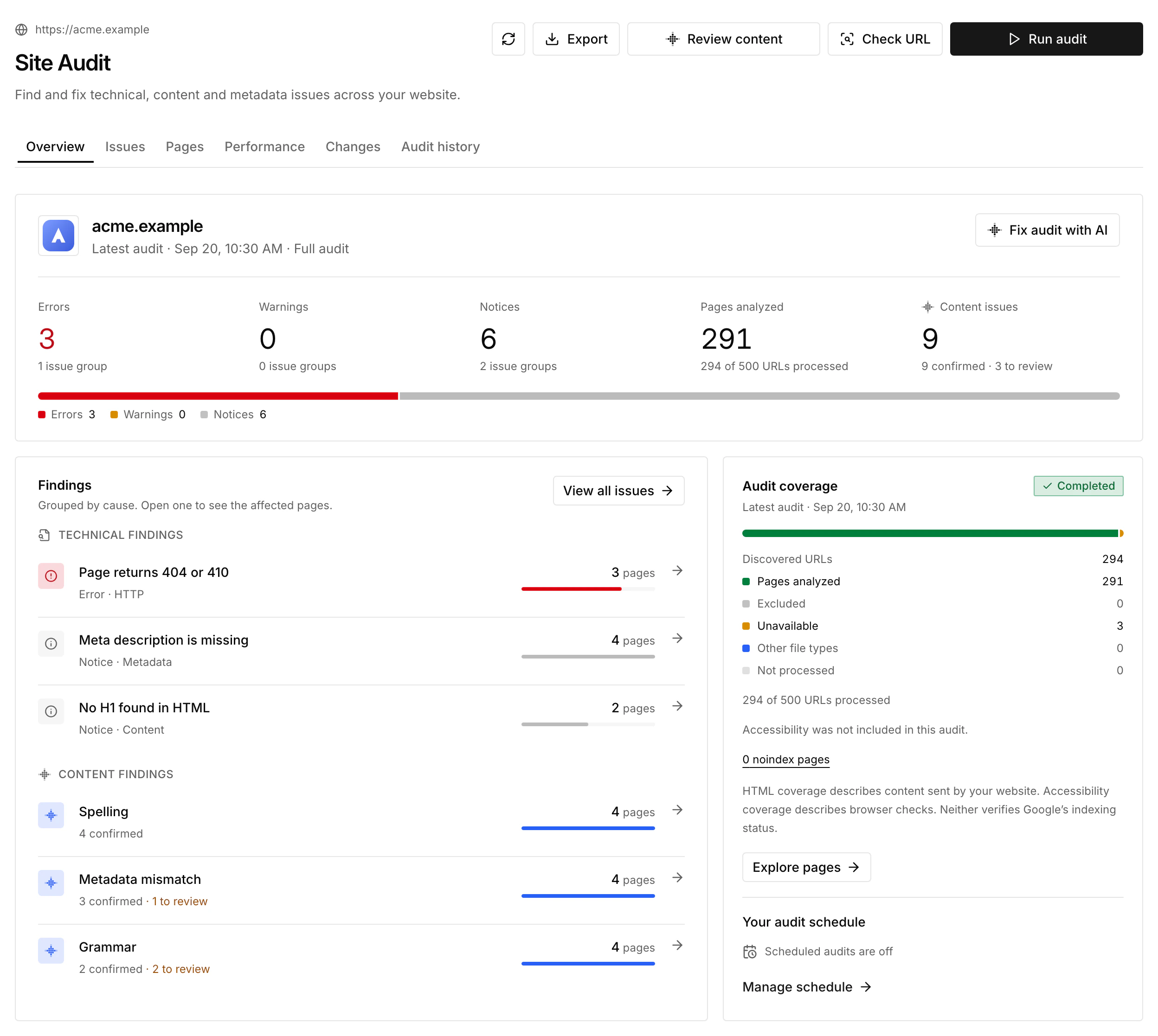
A finding that follows from another names it. For example, a broken link to a page that returns 404 shows Follows from "Page returns 404 or 410": restore or redirect that page, or update the links, then recheck both. Each finding keeps its own history.
Select a page to open its details: state chips for HTTP status, indexing directive, sitemap and canonical, then tabs for Issues, Google Search, Performance, Page data and Browser view. The Google Search tab shows the page's clicks, impressions and position from a connected Google Search Console property.
Check coverage before interpreting counts: excluded, failed and unvisited pages are not clean results. Completed means the run finished, not that the website has no issues. A noindex directive in saved HTML does not show Google's actual indexing status. Technical GEO checks describe page signals; they do not establish that an AI platform cites your website.
Pages lists audited pages; All known pages adds Google indexing when Search Console is connected. Open site map takes you to the Project's Sitemap, which shows the same URLs as a Map, a Structure tree or a List. The map groups paths into folders; its connections are not an internal-link graph. Highlight page health, Google index or sitemap evidence, then select up to 20 pages and choose Audit selected for fresh evidence.
Check accessibility
After the HTML crawl, every audit runs an accessibility stage on each successfully analyzed page, including scheduled audits, CLI audits and rechecks. A browser loads the page at a 1440 × 1000 desktop size and runs axe-core WCAG 2 A/AA, 2.1 A/AA, 2.2 AA and best-practice rules. Progress shows which stage is running and how many pages are checked; the HTML report stays readable meanwhile.
Confirmed violations appear in Issues under Accessibility, grouped by rule with affected URLs, example elements and explanations, and use the same fix, ignore and recheck flow as other findings. Inconclusive results stay in Needs review and are not counted as violations or passes. The check does not open menus or submit forms, so it does not replace manual testing; failed or unchecked pages are not clean results.
Fix and verify
Use Fix audit with AI for a report-wide brief, or the AI action on an issue, a page or selected pages for a focused task. In hosts that support MCP Apps, Fix in chat in the SEO/GEO panel sends one issue's repair instructions to your agent. The brief includes saved technical or content findings and their scope. Copying it does not run AI or change your website.
Trust findings need facts only you can supply. Link the About, contact or legal pages you already have, or add real details yourself; the brief tells your agent never to invent names, biographies, contact details or legal text.
Review the proposed change, publish it, then recheck. The Changes tab keeps resolved, remaining and not-rechecked findings separate. Cross-page problems, such as duplicate titles or link relationships, may need a new full audit. When SiteOS adds checks, run a new full audit before rechecking pages from an older one, so both use the same checks. Ignore records a decision; it does not mark the issue as fixed, and you can restore it later.
Measure Performance
Open Performance and choose Check pages. Select up to 10 successfully analyzed HTML pages from a saved full audit, then choose Mobile, Desktop or All. All measures both devices one after the other, with separate results. For a single page, use Measure speed in its details.
A separate server-side browser runs Lighthouse for each page. Results include Performance, Accessibility, Best practices and SEO scores, the experimental Agentic Browsing pass count, lab metrics (FCP, LCP, TBT, CLS and Speed Index) and recommendations ordered by estimated savings. Browser view compares response HTML with the rendered page. Fix with AI copies a prompt with the page's saved evidence.
The summary shows the median Performance score of the measured pages and its change from the previous check on the same device. It describes those pages, not the whole website. Lighthouse is a lab measurement, not real-user Core Web Vitals; lab TBT is not INP. Compare the same page and device under similar conditions. Technical audits and Performance do not consume research credits.
Schedule, notify and share
SEO/GEO settings → Audit schedule runs a full audit every day, on weekdays or on selected days, at a local time and time zone. Each scheduled run compares the website with the previous audit. Scheduled audits do not run Performance checks or paid AI content reviews.
Open Notifications in the SEO/GEO sidebar to send audit results for this environment to an Organization or personal destination, such as a Slack channel, Telegram chat or email address. See Integrations for destinations. SiteOS notifies after an audit finds new or reopened errors, or warnings too if you choose, and optionally when an audit is incomplete. Unchanged and ignored issues and page rechecks stay quiet.
Download saved results from Export as PDF, Excel, CSV (ZIP) or JSON. For spelling, grammar and suggested corrections, start a separate content check.