AI visibility
Track brand mentions and citations in AI answers, inspect saved answers and turn evidence into tracked actions.
SiteOS tracks how AI answers mention your brand and cite your website, side by side with up to five competitors. Save the questions your customers ask, check them on ChatGPT, Claude, Gemini and Perplexity, and follow mentions, citations and the sources AI platforms rely on over time.
SiteOS offers three ways to study your presence in AI answers. They answer different questions, so choose the one that fits your task.
All three are included in free access. New measurements use your Organization's monthly SEO credits; reading an existing report does not. For a comparison with a specialized AI visibility platform, see SiteOS vs Searchable.
Brand lookup
Enter the brand or domain you want to investigate and choose the index: ChatGPT (United States, English only) or Google AI Overviews. Review the returned mentions, example questions and cited pages, along with the provider's total of matching answers and AI search volume when it is available.
This searches a provider's answer index, so coverage depends on that index and its observation period. It is not a complete record of every conversation about the brand.
Prompt checks
Write a question your audience might ask and choose the platforms you want to sample: ChatGPT, Claude, Gemini and Perplexity, with web search. Each platform shows whether the answer mentions your brand and cites your site, the change since the previous comparable check, and an excerpt around the mention.
Open the saved answer to inspect what it says, which sources it cites, and the model and check time. These are model API samples with their saved settings; they need not match a particular person's consumer chat.
Monitor with AI Visibility
AI Visibility keeps your questions in persistent question sets, so every check of a set can be compared with the previous one.
Create a question set
Choose Create question set and follow its three steps:
- Brand & market: your brand and up to five competitors, each with its domain and optional aliases, plus the country, language, up to four AI platforms and the answers per question.
- Questions: 1–10 active questions, each with an optional topic and tags. Archive a question to stop asking it while keeping its history; a set holds up to 100 questions.
- Review: check the set and save it.
AI platforms do not give the same answer every time. Answers per question asks each question 1, 3 or 5 times on every platform; the default is 1. Every answer counts separately, so more answers give tighter ranges around mention and citation rates. Each answer is a separate AI request and uses credits, so 3 answers per question cost about three times as much as 1.
Your Organization can send up to 100 AI requests a day. One check asks questions × platforms × answers per question, so 3 or 5 answers are available only while a whole check fits that daily limit. For example, 10 questions on four platforms need 40 requests with 1 answer but 120 with 3, so only 1 is available; the editor shows how many requests the set would need. Remove questions or platforms to use more answers. One answer per question is always available.
Saving a set does not run a check or spend credits. With Google Search Console connected, Questions can suggest saved Google queries for you to edit into questions. Google impressions show search demand, not how often people ask AI platforms.
If you created your Project with guided setup, its first check may already be saved as a manual question set: up to five generated questions, your brand and up to four competitors suggested from your website and search data, asked on ChatGPT, Perplexity and Gemini.
Run a check
Choose Run check and confirm the scope: questions × platforms × answers per question, with the most the check can hold from your credits. SiteOS reserves $2 before each AI request and returns unused credit. Requests run in sequence and stop when the next reservation does not fit your balance. Answers are saved as they arrive, so you can leave the page.
Read the results
The header shows the selected set, its market, counts and schedule. Filter by platform, topic or tag, and pick an earlier check from the saved-check menu, which shows each check's mention rate.
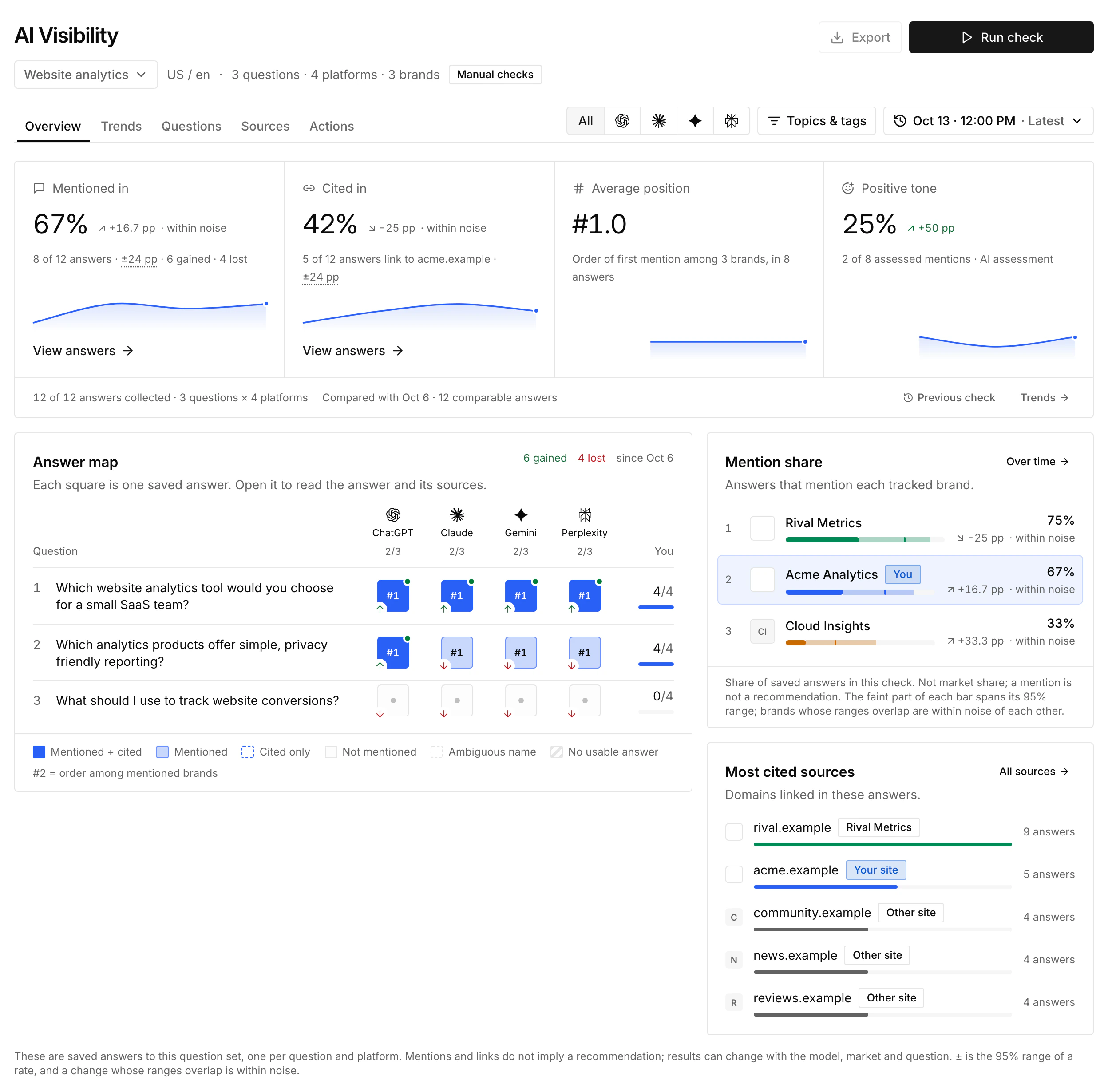
- Overview shows mention rate, citation rate, average position and positive tone, each with its change from the previous check. The answer map has one square per answer: one per question and platform, or a row of smaller squares when the set asks several times. Mention share ranks the tracked brands, and the most cited sources lead to Sources.
- Trends charts mentions, citations, position or tone across checks, with a history for each brand and each question.
- Questions lists every question with short excerpts from its answers.
- Sources groups cited links by domain: your site, a tracked competitor or another site. It also lists sites cited in answers that mention a competitor but not you.
- Actions holds the action plan and the improvements you track.
Select a result to open the saved answer: its platform and model, the tracked brands with their order, citation and tone, the answer text with brand names highlighted, and its sources.
Mentions and citations are separate: a source link does not necessarily mean the answer recommends or even names the product. Missing, failed and unreadable answers remain distinct from a readable answer without a mention.
Changes compare only answers that are comparable with the previous check: the same question version, brands, market, model and search settings. They appear in percentage points with the number of compared answers. Position is the order in which tracked brands first appear in an answer, averaged over answers that mention the brand; a smaller number means earlier. It is not an overall AI ranking or a Google position.
Questions where a tracked competitor is mentioned in at least two readable answers and your brand in none also appear in Opportunities, ranked with your other next steps.
Analyze tone
Tone analysis is a separate, explicit step for a saved check. Analyze tone shows how many answers will be assessed and the maximum cost, up to $0.01 per answer from your SEO credits. It reads the saved answers and does not ask the AI platforms again. New checks do not analyze tone automatically.
Each mentioned brand is classified as positive, neutral, mixed, negative or uncertain; low-confidence results stay uncertain. Positive tone is the share of known assessments that are positive, with coverage shown separately. This is an AI assessment of the answer text, not a verified fact about the brand.
Repeat checks automatically
Every question set starts with manual checks. To repeat it, choose Set up automatic checks in the set's header, turn on Run checks automatically and choose every day or a day of the week, a time and a time zone. Checks then run in the background, even when the page is closed, and the next check time appears beside the set. Turn the switch off to pause.
Before you save, the dialog shows the cost of one check: the most it can hold or, after an automatic check has completed, about what a check costs. Each set has a monthly limit in US dollars that covers at least one complete check. A scheduled check holds up to $2 per answer against that limit until its actual cost is known; the limit resets each calendar month (UTC). Automatic checks use your Organization's SEO credits like manual ones, and manual checks do not count toward the set's limit. A scheduled check that would exceed the limit, or that cannot start because another check is busy, is skipped, with the reason shown beside the schedule. Editing the questions or the answers per question, or changing the website, pauses the schedule until you save it again. A set with 3 or 5 answers that no longer fits the daily request limit is also paused until you edit it.
To hear about changes, open Notifications in the SEO/GEO sidebar, choose the AI answers topic and turn on Enable AI answer alerts. After each automatic check, SiteOS compares it with the two previous comparable checks, with the same questions, platforms, models and answers per question. It sends one message to the destinations you choose, such as Slack, Telegram or email, only when a change you selected holds in two checks in a row: your brand is no longer mentioned in an answer where it was before, is mentioned in a new answer, or falls behind a competitor in mentions. A change seen in a single check stays visible in the report but does not send an alert; a message counts such changes as not yet confirmed. Unreadable or ambiguous answers are never reported as losses, and manual checks never send alerts.
Generate recommendations
Open Actions with a completed check selected. Under Turn this report into an action plan, review the pages SiteOS will read: your homepage, and up to four pages suggested from your latest full site audit that match the report's questions. You can add other pages on the same website, up to five in total, and Add context (optional) for the analysis.
Generate action plan is an explicit AI operation. It shows the maximum it reserves from your SEO credits; only a successful plan is charged, and each report has one plan. An owner or administrator can generate it. The report and the selected pages' public text are sent to the AI provider.
The saved plan opens with the recommended focus and priority counts. Each action has a kind (update a reviewed page, create content, work off-site or measure), a priority, what the answers show, the proposed change, numbered steps, the exact quotes behind it and how to verify it. Unavailable pages and limited answer coverage remain visible.
Use Copy full AI brief to give every action and its evidence to your agent, or copy an individual action. A PDF export includes the saved plan. Copying or exporting does not generate a new plan or refresh the check. After a failed generation, Retry action plan retries that analysis with its saved inputs; it does not rerun the AI Visibility check.
Example: from an answer to a page edit
On 4 October 2026, we sampled three questions across ChatGPT, Claude, Gemini and Perplexity for a SiteOS comparison. The questions were in English with a requested US market context:
- Which tools help a B2B website team audit technical SEO and turn content issues into a prioritized action plan?
- Which platforms help marketing teams track brand mentions and source citations in AI answers alongside competitors?
- What tools would you recommend for a company managing SEO and AI search visibility across several websites?
All 12 requested answers were included. SiteOS was mentioned in 0 of 12, Semrush in 11, Conductor in 6 and Peec AI in 3. These are counts within this question set, not market-wide visibility or a ranking of product quality. An answer can mention several products.
The action plan combined those answers with five public SiteOS pages. The sampled answers discussed audit prioritization, competitor comparisons and source citations. Our documentation already described relevant workflows, but the product comparison's AI visibility cell named only Brand lookup and Prompt checks. It did not explain the separate AI Visibility comparison workflow.
That gave us a specific editorial decision: make the existing workflow easier to understand and link it to its documentation. The absence of SiteOS in the sample did not establish why it was absent, or prove that this edit would change future answers.
Reviewing the published page verifies the content change. A new comparison provides separate evidence about mentions and citations; even a change in those counts would not, by itself, show that the page edit caused it.
Track actions and measure results
Choose Track action on a recommendation, select the questions the change is meant to help and Add to my plan. The current check becomes the action's baseline. Tracked actions stay with the question set and move through Planned, In progress and Implemented. Tracking does not use credits.
When you mark an action implemented, record the public page on your website and its publication date. Later checks compare brand mentions and website citations for the action's questions with the baseline, using only answers collected after publication. The Run follow-up check action runs the whole current question set and uses credits.
Recommendations are proposals for your team to review. They do not edit the website automatically or guarantee future mentions. A change after implementation is an observation; other factors may contribute.
Keep the evidence
Each check retains its inputs, observation dates and available answers. Export in the AI Visibility header downloads the selected check as PDF, Excel, CSV (ZIP) or JSON. The PDF follows the Overview with changes, trends, mention share, platforms, the answer map, tone and cited domains, and includes the saved action plan. Check partial coverage before drawing conclusions.
Links to checks saved before question sets open the current set instead. In Check history and saved checks, you can reuse their questions to start a new set. Older reports can retain historical scoring methods in their exports; current checks focus on observed mentions, citations and readable-answer coverage.
Your agent can create and run question sets with the SiteOS CLI and read saved checks, Prompt checks, Brand lookup reports and action plans through MCP. Generating action plans, analyzing tone and enabling automatic checks stay explicit actions in the application.
Use content checks for writing problems on your own pages and search research for Google keywords, SERPs and competitors.