Search analytics
Understand completed searches, content gaps, result clicks and the performance of individual articles.
Search analytics measures interactions with your connected search interface. It reports what people search for and which results they open. It is separate from Website Analytics, with its own collection settings for each index.
Choose how to collect
Open Search → Analytics → Collection settings for the intended index and environment. New indices start with independent collection enabled and 30-day retention. Existing indices keep their previous enabled/disabled setting, retention and consent-required mode.
- Independent collection records searches and result clicks without waiting for a banner choice. It creates no cookies or persistent visitor IDs.
- Require analytics consent records events only after the website supplies the visitor’s analytics choice. SiteOS Cookie can supply it; another consent manager needs an adapter for the initial choice and later changes.
Both modes respect website opt-out, Global Privacy Control and Do Not Track. Search remains available when collection is off.
The search client reads this setting from the index’s suggestion and query responses with prepareAnalytics(), so a changed setting applies to updated clients without code changes. Event recording still has to be installed in the search interface once, and Require analytics consent also needs the website to supply the visitor’s choice. See Website connection.
Update integrations written before 12 October 2026. Remove the analyticsMode option and call prepareAnalytics() before an interaction starts. SiteOS rejects event receipts without a collection mode, so an older client keeps returning results but records nothing.
Understand the counts
Typing updates within the same active interaction replace its recorded query and results instead of counting each keystroke as another completed search. Clearing or closing search ends that interaction. These counts describe searches, not unique people. A dash means no denominator is available for a rate.
Playground, CLI/MCP queries and installation checks are excluded. Curated empty-query suggestions are also outside these metrics.
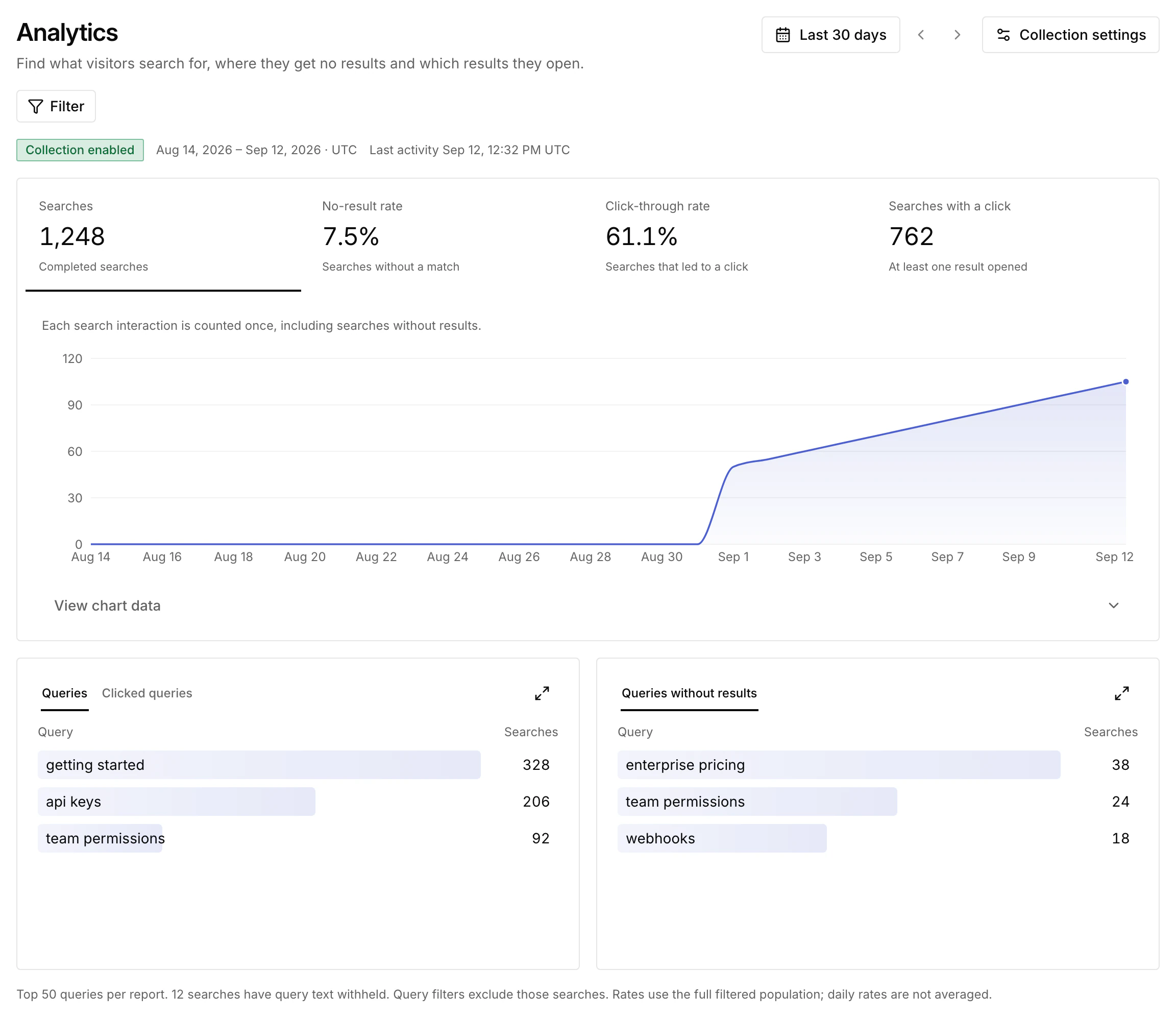
Explore queries and article activity
Choose a reporting period and filter queries, no-result searches or searches with a click. Open a query and choose Test in Playground to inspect current results; the current index may differ from the one used for the original search. For a query in Queries without results, Add synonym opens Relevance with a synonym draft for it.
Content adds article-level appearances, clicks and CTR for the selected period. An appearance means the article was included in the recorded result list, up to the first 20 results, once per interaction. It is not a viewport impression or a count of every matching document.
Article CTR divides verified article clicks by those appearances. Open an article to see its top contributing reportable queries. Sort by appearances to find visible but unhelpful titles, or by clicks to find useful pages.
Retention and query privacy
Choose 7, 30 or 90 days of retention. Enabling collection does not backfill earlier searches. Disabling it stops new collection; it does not immediately delete retained history. A report can include activity from more than one collection mode after a setting change.
Search uses an in-memory interaction identifier rather than a persistent visitor profile. Query text can still contain personal information. Common sensitive patterns are withheld by a limited heuristic, while aggregate counts remain; it is not a guarantee that all sensitive text is detected.
Read reports as JSON
After selecting your Project, list indices and use the intended ID:
Replace INDEX_ID with a returned ID. The content command is paginated; follow the response pagination with --offset when collecting more records. These are authenticated report reads, not visitor events. Search does not currently offer a formatted PDF or CSV report download in the dashboard.
If the report remains empty, check the index, period, collection setting, opt-out state and installed event integration, including whether the client predates 12 October 2026. In consent-required mode, also check the visitor’s analytics choice. Then perform a real website search and result click and inspect Last activity.