Scans, records & exports
Discover services, verify consent behavior, review scans and export consent evidence.
Cookie provides several kinds of evidence: observed services, behavior after a visitor’s choice, consent records and anonymous aggregate trends. They answer different questions; a record of acceptance is not proof that every script followed it.
Discover and verify
Your agent can discover services on a public page and compare them with the configured inventory. Discovery can also inspect a bounded local source directory or GTM export when explicitly supplied. It does not automatically change your draft, install vendors or publish tags.
These commands open a browser against the selected environment’s website. Use a same-origin --url to check a specific public page. Verification exercises the consent flow and records evidence; review partial or unknown results instead of treating them as a pass.
When Trace is connected in the same environment, its recent provider observations can help identify services that differ from the declared inventory. Reviewing those differences is separate from editing the banner or tag configuration.
Example: verify one optional service
Use a staging page with a published strict opt-in rule and one optional service connected to its consent control. For example, install a Google Analytics tag in Basic Consent Mode and configure its grant and withdrawal behavior. A service selected in Cookie's catalog is not enough: follow Installation & integrations to connect the actual tag.
Record the page URL, publication revision, resolved regional rule, runtime version and service being checked. In the browser console, SiteOSCookie.getDebugState() exposes the active configuration and managed-service state; SiteOSCookie.getConsent() exposes the current choice. Compare those states with requests and storage in the browser's developer tools. Readiness or a granted purpose alone does not prove that the tag behaved correctly.
The table below is an expected-behavior checklist for this setup, not a recorded scan result. Start the rejection and acceptance paths in separate fresh browser contexts; continue from acceptance when testing withdrawal.
Run siteos cookie verify --json against the staging environment and retain its complete report. Compare the checked scenarios with your manual evidence, including the time and any unclassified requests or storage keys. Mark each result as observed, failed or not checked; an absence of evidence from an unfinished scenario is not a pass. Repeat on the representative routes and regional configurations your website actually uses.
This Basic Consent Mode example expects the tag to stay blocked before a grant. Advanced Consent Mode can intentionally send cookieless Google signals while consent is denied, so it needs a different set of expected results. Do not apply this table to every analytics setup.
Trace is optional for this walkthrough. Its consent and privacy guidance explains how supported requests and SDK loads can be compared with observed consent. Trace observes behavior; Cookie and the connected integrations control it. If Trace itself starts only after consent, it cannot supply the earlier observations.
Check pull request previews
With Pulse GitHub PR checks and Trace in the same Project environment, and the SiteOS Cookie banner as Trace’s consent source, passing browser Checks also run a consent pass on the pull request preview. Up to three pages the Checks visited open again in a fresh browser, once with Accept all and once with Reject all.
The GitHub Check’s advisory Tracking section flags a Google Analytics, Google Ads, Meta Pixel or HubSpot tag that still sends after Reject all; Google Analytics cookieless Consent Mode pings are expected. The pass blocks consent receipts and banner metrics, so it never adds records to your Cookie reports, and it never changes the Check’s result. It covers only those pages and the two choices; withdrawal and Global Privacy Control remain for scans and verification.
Saved cloud scans
Open Scans to check the environment’s website with its published banner and review saved reports. Scanning also needs the hosted scanner enabled for your environment; when it is unavailable, saved reports stay readable. Anyone with access to Cookie can read reports; running, cancelling and scheduling scans requires permission to manage Cookie.
Each scan uses synthetic Chromium desktop visits in fresh browser contexts: a first visit followed by rejection and reload, acceptance followed by withdrawal and reload, and a separate Global Privacy Control visit. These visits may appear in your website analytics and consent records.
A scan starts with the homepage and up to ten priority paths, then follows same-origin links and a conventional sitemap within your exclusions and robots.txt, up to 50 pages per run. It does not log in, fill forms or click purchase controls. Evidence records cookie names and attributes, storage keys, request origins and page paths, not their values, request or response bodies, query parameters, headers or page HTML.
Reports separate execution status from findings. Optional storage observed while the banner blocks its service is an issue. Unclassified storage, unknown request origins and known trackers missing from your published services need review. A request alone, including Advanced Consent Mode traffic, does not prove a consent violation. A completed scan is compared with an earlier comparable one to show new and resolved findings on pages checked in both.
On Scans, Latest scan shows each service by visitor choice from the saved report, and Scan history lists earlier runs with their consent issues and new items.
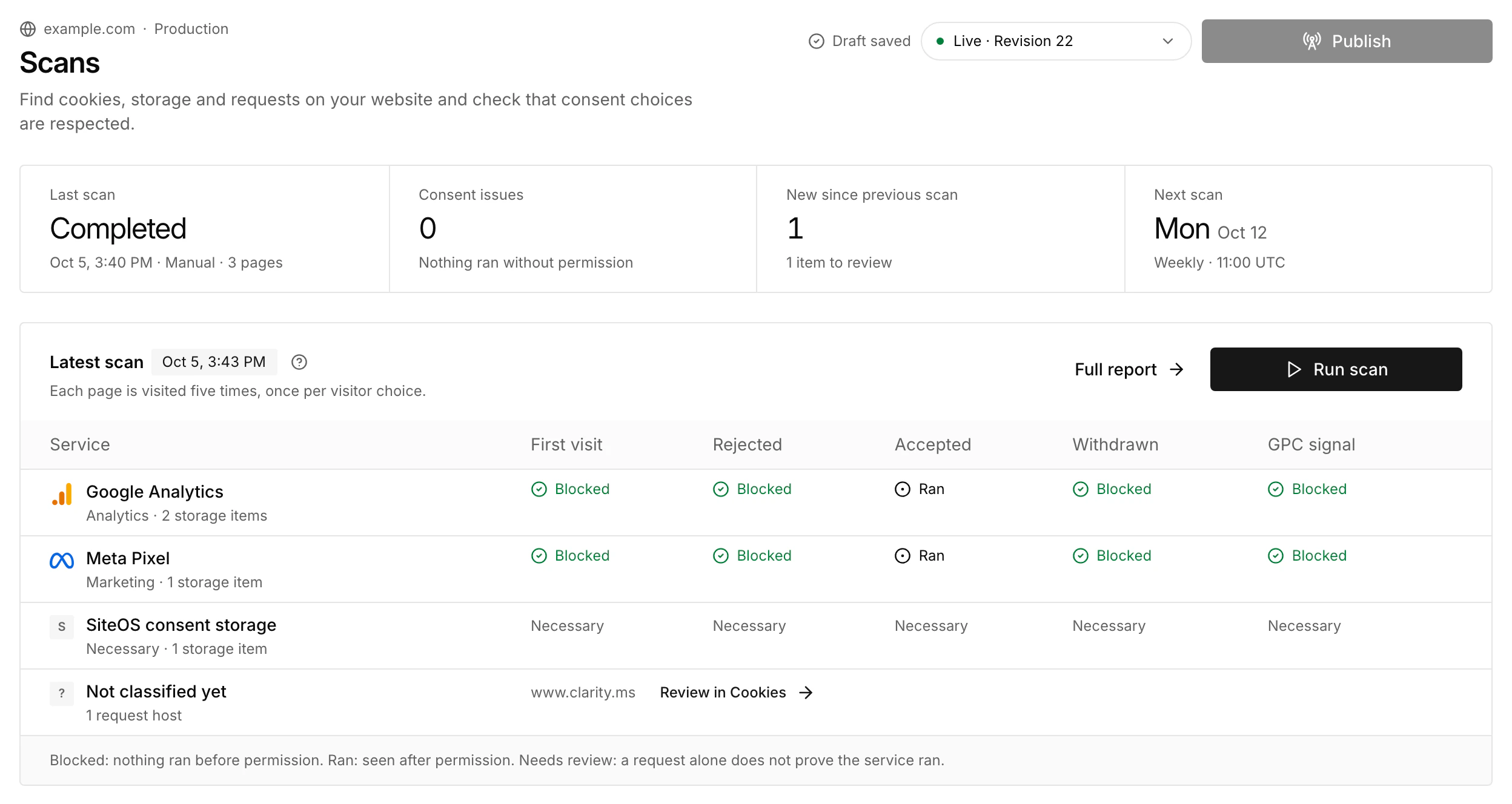
Your agent can start a scan and read the report through the CLI. A queued scan is not a completed report; inspect it until it finishes.
Cookie inventory
Completed scans fill the Cookies page. Filter it by status (Needs review, Ready for draft, In draft, On website or Ignored) or search names and services. Each item shows where it was seen, which origin set it, and a suggested service and purpose. Suggestions come from the service catalog, a public cookie reference and a public list of known third-party domains, and they are not legal advice. Confirm or ignore each item. Confirming an item records what it is; it does not block or allow anything for visitors.
When you confirm an item as a new service, add the vendor's privacy policy link if the suggestion has none. A new service needs that HTTPS link before it can be added to the draft.
Add to draft adds services that confirmed items need, plus rows for the cookie declaration. A new vendor service keeps the request domains the scan found, so automatic blocking can hold its resources until consent. It only changes the draft. New services ask visitors to choose again after you publish; declaration rows do not.
Optional weekly or monthly schedules use your chosen time and timezone; monthly runs take place on the first day. Schedules are disabled until configured. Set the schedule, pages and notifications with Edit schedule in the Schedule card on Scans. Notification destinations from Integrations can report new findings, confirmed recovery or failed scheduled scans.
Detailed page evidence expires after 90 days and report summaries after 365 days; the newest completed baseline is kept. An incomplete or unknown result is not a confirmed violation or recovery. Read the scope and evidence of the completed scenarios. These are bounded technical checks, not a certification of the entire website.
Consent records
The records view shows the decision, time, policy revision, resolved regional rule, category choices and relevant privacy signals. Access requires permission to manage Cookie. Filter the loaded records by choice or search for a receipt ID; choice counts, search and Export CSV cover the loaded records.
Records omit visitor IP addresses, user agents, account IDs, email addresses and arbitrary browser data. A record describes a browser’s consent decision; it does not identify an individual customer.
The dashboard loads up to the 1,000 newest records from the last 30 days. Stored records have a 395-day retention period. The dashboard window is therefore smaller than the retention period.
Aggregate trends
View banner activity, choices, countries and trends over 7, 30 or 90 days. These are anonymous aggregate metrics, not a count of unique people and not a replacement for individual consent records.
Export data
Use the scan ID returned by the list command. Exporting does not publish the records or change your banner. Keep downloaded consent evidence within the access boundaries appropriate for your Organization.