Cookie overview
Design a consent experience, connect visitor choices to your services and verify real website behavior.
SiteOS Cookie manages your website’s consent banner, preferences and published rules. It combines design controls, translated content, a service catalog, regional behavior, consent records and checks of the scripts actually running on your website.
Cookie belongs to a project environment. Select the intended environment before editing, installing or publishing. Production and test configurations remain separate. Setup and publication require your Organization to have accepted the current SiteOS terms, including the data processing agreement. One acceptance covers the Organization; the person accepting confirms they can act for it.
What you can configure
- Design: colors, layouts, spacing, surface effects and a customizable preferences widget. Match your website’s style with the SiteOS plugin and Cookie skill.
- Content: service purposes, provider details, editable translations and regional variations.
- Geotargeting: rules for the European Economic Area, individual countries and subdivisions such as US states, with opt-in, opt-out with Global Privacy Control, notice-only and essential-only behavior.
- Integrations: Google Consent Mode, tag-manager controls, optional automatic blocking, US privacy signals (IAB GPP) for advertising partners and optional SiteOS Analytics control.
- Evidence: service discovery, consent verification, scheduled cloud scans, consent records and aggregate trends.
- Disclosure: a cookie inventory built from scans and reviewed by your team, and a public cookie declaration for your cookie or privacy policy page.
Set up your website
- Review the services your website actually uses. Add service searches ready-made services and the services SiteOS knows; a known service arrives with its provider and privacy details for you to confirm, or you can describe your own. From Trace, Add to Cookie opens the same step for a detected service, Publish in Cookie finishes one already in your draft, and Identify in Cookie links a tag or domain Trace could not name to one of your services.
- Design the banner and configure regions and trusted hosts. Preview both the first banner and the preferences visitors can reopen.
- Publish the reviewed draft. Install the loader and connect your scripts using the details for that environment.
- Verify the result before a choice, after refusal and after withdrawal.
Saving a draft does not change the live website. Publishing makes that configuration available to the installed loader. Restoring a previous version creates a draft to review and publish again.
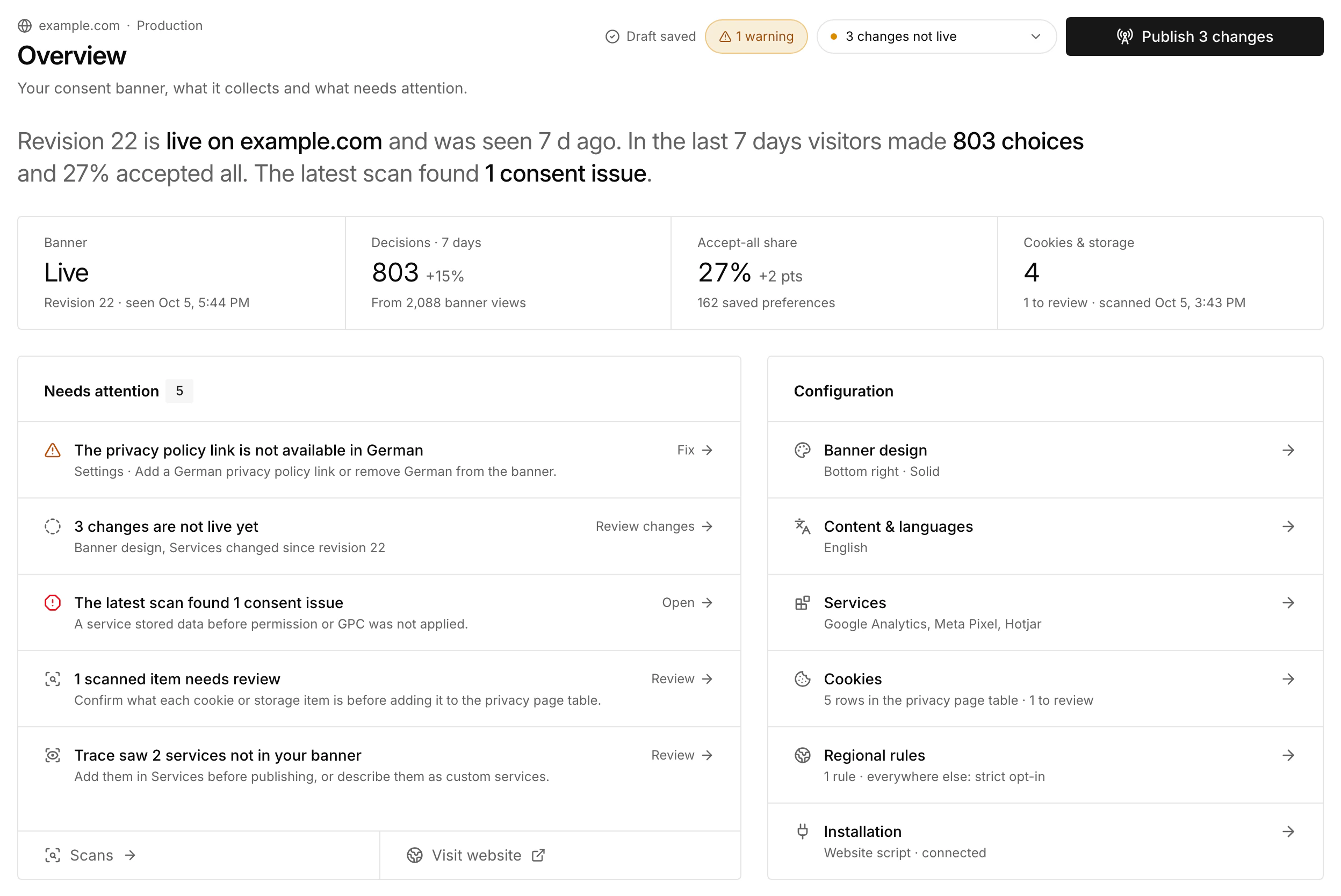
Every Cookie page shares one header with the live revision, what your website shows and what the draft changes. Publish shows how many changes it will publish, such as Publish 3 changes, and explains why when there is nothing it can publish. Overview lists what Needs attention, such as setting issues, unconfirmed manual checks, changes that are not live yet and scanned items to review.
Work with your agent
Through MCP, the SiteOS plugin gives your agent read access to the Cookie draft and published configuration, the service catalog, installation evidence and aggregate consent trends. CLI commands cover setup, drafts, discovery, publication, verification, cloud scans and the cookie inventory. MCP never returns individual consent records.
See AI & MCP for installation and sign-in. Useful reads in the selected project environment include:
Availability and scope
Cookie is available during early access without a paid plan. Operational limits apply. The Cookie product page summarizes its features; if you are moving from another consent tool, the comparisons with Cookiebot, OneTrust and iubenda include the steps for switching. Cloud scans also need a published banner and the hosted scanner enabled for your environment; the Scans page shows when scanning is unavailable. Read-only access does not grant permission to edit, publish or export protected consent records.
A visible banner is only one part of the setup. Catalog entries do not install vendor code. Optional automatic blocking works with the website script and covers only the catalogued services you select and the vendors you confirm from scans, not inline code or unconfirmed vendors. Regional profiles express the behavior you configure; they do not determine which policy your website must use. Google Consent Mode support and IAB GPP signals for the United States are separate from Google-certified CMP or IAB TCF status, which SiteOS does not claim.