Errors
Capture browser and server errors, group them into issues and read original source locations for each release.
Pulse Errors collects runtime errors from your website and server and groups repeated reports into issues. It works without Checks: Check results never change an issue, and errors never open monitoring incidents. If you already use Sentry, SiteOS vs Sentry explains where each tool fits.
What Errors collects
- Unhandled browser exceptions and Promise rejections.
- Errors your React error boundaries report.
- Next.js request errors through
onRequestError. - Server errors you report explicitly with the Node client.
A report contains the release, error name and message, a bounded stack trace, the route template and optional breadcrumbs. The SDK never collects request bodies, cookies, headers, DOM text, form values, query strings or user identifiers, and removes common secret patterns before sending. Error messages can still contain sensitive text; use beforeSend to change or drop a report. Extension errors, known browser noise and bots are filtered by default.
Set up collection
Open Pulse → Settings → Collection in the Project environment and select Configure (or Set up) next to Errors. The Settings button on the Errors page leads to the same place, and Set up with AI copies a prompt for your coding agent. Changing collection requires Pulse Manager access. Each environment has its own settings and keys, and the setup is shown as numbered steps with a Status card beside them.
- Turn on collection: switch on Collect errors, enter up to 20 exact HTTPS origins in Website origins, one per line, without paths or wildcards, and select Save settings. Add Preview origins explicitly.
- Install the SDK: copy the install command, environment variables and setup code shown in the step.
- Keys: copy the public Browser key. For server capture, select Create keys (or Replace keys… and confirm). The server key is shown once; store it as a server secret. Replacing creates a new browser key too, so update both.
- Upload source maps: create a build key here or with the CLI (see below).
- The last step turns to First error received when the first report arrives.
The browser key is public and only accepts reports from your listed origins. Neither key can read errors or change settings, and replacing keys stops installations that use the old ones.
Install the SDK
Add @siteoshq/pulse to your application. It provides a browser client (root entry), a Node client (/node), a Next.js request-error handler (/nextjs) and a config wrapper (/nextjs/config).
Wrap the final config, outside plugins such as withMDX. It sets NEXT_PUBLIC_SITEOS_RELEASE from SITEOS_RELEASE, VERCEL_GIT_COMMIT_SHA or the Git revision, so reports and source maps share one release. Keep the server key out of public variables.
In React error boundaries, call errors.captureException(error, { handled: true }) from a shared client module. Skip errors with a Next.js digest; onRequestError already reported them. Other Node servers use createClient from /node and await errors.flush() before a serverless request ends.
Consent
Browser collection waits for consent by default and buffers nothing until it is granted. Withdrawal stops capture, clears breadcrumbs and aborts pending requests; delivered reports cannot be recalled. collection: "essential" is an explicit choice under your site's policy. Server capture does not depend on browser consent. With SiteOS Cookie, call setConsent from a service permission subscription.
Readable stack traces
Upload private source maps so stack traces show original files and lines. With CLI 2.48.0 or later and the Project environment selected, issue a build upload key once:
You can also select Create build key in step 4 of the Errors setup; the key is shown once. The CLI writes the key to a new private file. Store its key value as the private build secret SITEOS_PULSE_SOURCEMAPS_KEY in CI or hosting. It can only upload maps for this environment and expires after a year: check expiry with upload-key list and run upload-key revoke --credential <id> after installing a replacement.
With Next.js 16.3 or later (16.x), next build uploads the maps and removes them before packaging, so they are never public. A failed upload stops the build; without the key, builds stay offline. Other build tools can call uploadSourceMaps from @siteoshq/pulse/build. Frames show Original source, Generated source or Third-party source; uploads do not change grouping.
Triage issues
Pulse groups reports by runtime, error type and code frames. The Errors page has Unresolved, Ignored and Resolved tabs with their counts. Each row shows the error, where it happened (runtime, route and release), its report count and when it was last seen; New marks an issue first seen in the last day, and Came back after a fix marks a regressed one. Select a row to open the issue in a side panel with its report count, first and last seen, the stack trace per occurrence and Before the error breadcrumbs. Copy for ticket copies a short summary. With Pulse Editor access:
- Resolve marks the issue resolved. A new report after that marks it regressed.
- Ignore keeps evidence without notifications.
- Reopen returns a resolved or ignored issue to open.
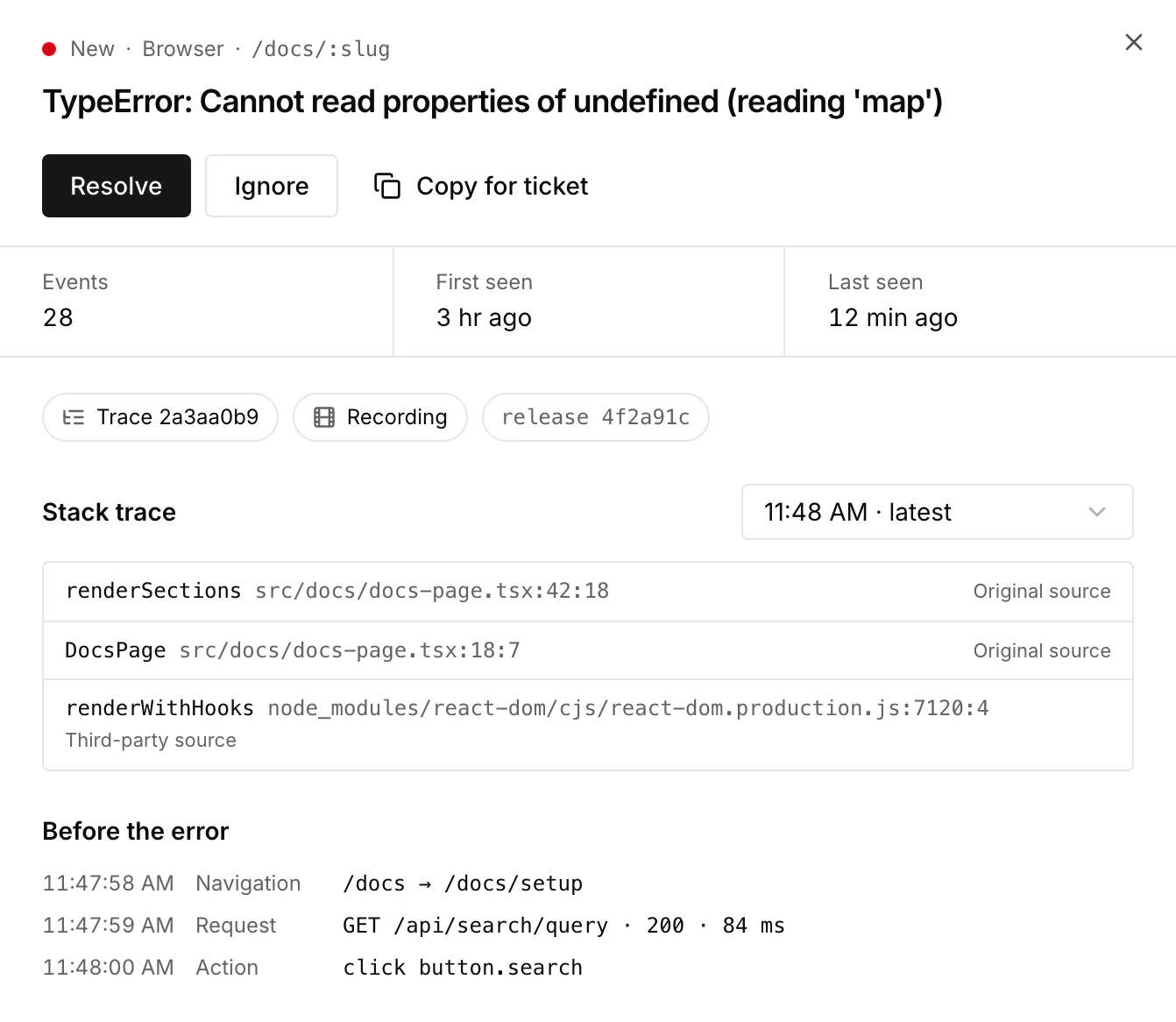
Pulse never resolves an issue because reports stopped. Waiting for first error or an empty list does not prove that every journey works. Unresolved errors that are new, recurring or reported in the last day also appear in Needs review on the Pulse Overview, and the Errors item in the sidebar shows how many are unresolved.
To be notified, connect a destination through Integrations and choose it under Notify about new and recurring errors in the first step of the Errors setup. Notifications cover new and regressed issues and are off by default.
Related traces and recordings
An occurrence shows a Trace link when its report carries trace context, and Recording when Replay linked a recording. Add them with getTraceContext on the server and getReplayId in the browser; see Logs, traces & replay. Traces and recordings are sampled, so many occurrences have neither. Viewing a recording requires Pulse Manager access.
Retention and counts
Reports are kept for 30 days and issue summaries for 90 days after their last activity. Counts are received reports after sampling, deduplication and limits, not total failures or affected visitors. Each environment retains up to 10,000 reports; after that, Collection capacity reached appears and new reports are discarded until older ones expire.
Work with your agent
Through the SiteOS plugin, siteos_pulse_list_errors and siteos_pulse_get_error read collection status, issues, sanitized reports and mapped source locations without changing anything. In the CLI, siteos pulse errors list and siteos pulse errors show --issue <id> read the same data; siteos pulse errors triage changes an issue's status. With CLI 3.2.0 or later, siteos pulse errors configure saves collection, origins and the alert destination, and siteos pulse errors key replaces both collection keys and writes the server key to a new private file, like telemetry and replay.